Q&A with the Gallup New Deal Art Virtual Museum Web Developers
Kevin Wolf and Kyle Gulau of Percent Invisible are the web developers behind the Gallup New Deal Art Virtual Museum. Here, they give insight into the process of designing and building a first-of-its-kind virtual museum.
How did you go about translating what is traditionally an in-person experience into a digital experience?
Translating an in-person museum experience into a digital one required us to rethink how people feel and interact with art when they can’t physically stand in front of it. Our goal wasn’t just to replicate a gallery online – it was to create an experience that would engage visitors on their own terms, through curiosity, discovery, and storytelling.
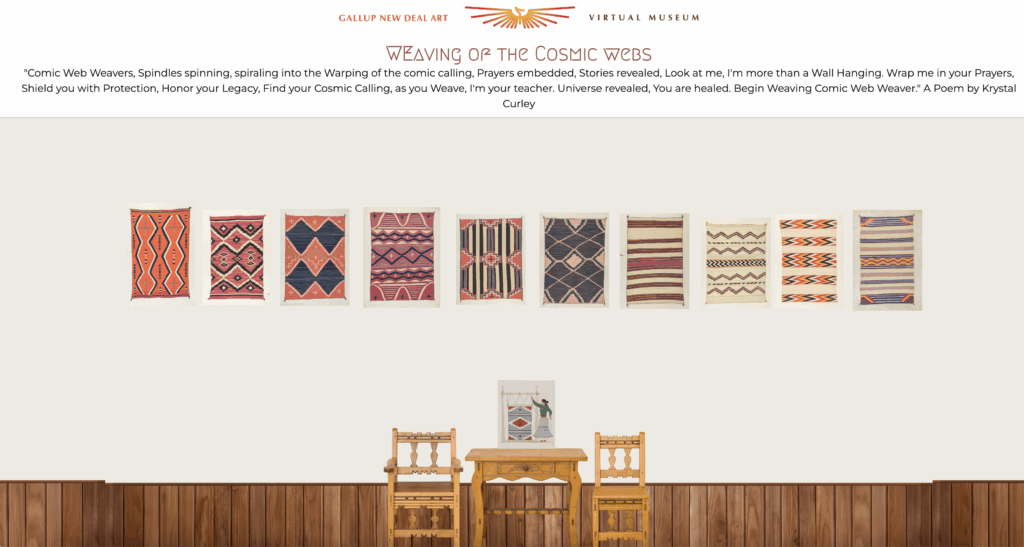
We used white space and visual pacing to create a structured, spatial experience – one that gives each artwork room to breathe and helps visitors feel grounded as they move from piece to piece. We designed layouts that allow art and interpretation to be viewed simultaneously, so users can engage both visually and intellectually without losing their sense of place.
We also introduced the concept of digital “rooms” for special exhibitions, echoing the feeling of walking through curated spaces. Clear wayfinding, intuitive navigation, and thematic groupings guide visitors organically, making exploration feel fluid and intentional.

We also prioritized accessibility and immersion: offering high-resolution images, contextual information, and narratives that bring the artists, the community, and the New Deal era to life.
Ultimately, we aimed to build not just a website, but a virtual museum – a place where design, storytelling, and structure work together to evoke the contemplative and communal qualities of viewing art in person.
What are you able to accomplish in terms of a museum experience online that you are not able to physically and how did you capitalize on those opportunities?
The online format opened opportunities for interaction, exploration, and depth that go beyond what’s possible in a physical museum. We were able to create a more participatory experience – one where visitors aren’t just viewing art, but actively engaging with it.
Interactivity became central. We introduced prompts that guide users to look more closely, encouraging slow, intentional viewing rather than passive scrolling. The ability to magnify artworks invites a kind of intimacy rarely possible in person – viewers can zoom into brushstrokes, textures, and details that might otherwise go unnoticed.

We also used hyperlinks to connect related works, artists, themes, and other online resources, allowing visitors to follow threads of interest. This networked approach mirrors how people think and learn online, turning the museum into an open web of discovery rather than a linear tour.
The virtual museum also lets visitors filter and search the collection, curate their own paths, or explore groupings by topic or era. This personalization – the ability to shape one’s own museum experience – is something physical galleries can’t easily replicate.
In essence, the virtual museum allowed us to blend storytelling and interactivity in ways that expand both access and engagement – transforming viewing into active participation and making the Gallup collection a living, evolving resource.

What best practices and latest trends in web design did you use? How did you keep the virtual museum on the cutting edge?
We followed core web design best practices focused on clarity, accessibility, and storytelling. Clean layouts, generous white space, and balanced typography create a calm, structured experience that keeps the art at the center.
We used responsive, modular design so the museum adapts seamlessly across devices and can grow with new “rooms” and exhibitions. Subtle interactivity, guided-looking prompts, and smooth navigation reflect current trends in user-centered digital storytelling.
By combining clean, minimal design with strong usability and accessibility, we created a virtual museum experience that feels both timeless and forward-looking.

Click to play screen-recording.
What did you learn during evaluation and user-testing that was surprising or unexpected? How did you incorporate those learnings into the design?
One of the most surprising insights from user testing was that visitors did not prefer video format for viewing artworks and exhibits. They wanted to move at their own pace, explore selectively, and control how much information they consumed.

We responded by creating web pages with short, digestible content blocks, expandable text, and guided-looking prompts instead of long-form video.
We also learned that users value a sense of orientation online, so we refined wayfinding and page structure to make navigation clear and consistent throughout the museum.
How did you approach the task of developing an online experience for a broad public and different audiences?
We designed the virtual museum to be welcoming and intuitive for a broad public, from casual art enthusiasts to scholars and researchers. Early in the design process, we coined the guiding principle that “anyone from 8 years old to 80” should be able to use the site.
We used plain, inviting language so visitors can choose how deeply they want to engage. Search tools, thematic groupings, and interactive prompts allow people with different interests or backgrounds to find meaningful connections.
The site also follows accessibility best practices and responsive design standards to ensure everyone (regardless of device, ability, or familiarity with art) can explore comfortably.

By combining clear structure with flexible discovery, we created an experience that meets people where they are and invites them to explore on their own terms.
DIY Exhibit: How did you address engaging users in content creation within a learning context? How did you meet expectations for a digital design/curation experience while centering discussion and exchange of ideas?
For DIY Exhibits, we focused on making content creation intuitive, fun, and educational. Visitors can curate their own mini-exhibits by selecting works, adding descriptions, and arranging them in digital “rooms,” which encourages active engagement with the collection.
At the same time, we ensured the interface met expectations for a digital design experience – clean, responsive, and easy to navigate – so the process of curation felt natural and empowering. By combining structured guidance with creative freedom, the DIY Exhibit centers both learning and the exchange of ideas.
What are the key takeaways from all of this?
Through our experience with the Gallup New Deal Art Virtual Museum, we’ve found that starting with a virtual museum can be a powerful strategy for future museum owners and managers. It allows testing and rapid-prototyping of navigation, storytelling, and engagement strategies before committing to physical space. By revealing what resonates with visitors, which connections matter most, and how to structure exhibits effectively, this approach can make any future physical museum more informed, efficient, and centered on the visitor experience.
To summarize our key takeaways:
- Digital-first approach expands access: anyone, anywhere, can explore the collection, regardless of physical location or mobility.
- Flexible, layered learning: visitors can choose their own pace, dive deeper with expandable text, or skim for highlights.
- Guided exploration and interactivity: prompts, magnification, and curated pathways encourage active engagement with the art.
- Structure and design matter: white space, spatial hierarchy, and modular layouts create a sense of place and ease of navigation.
- Dynamic content and connections: hyperlinks, search, filters, and thematic groupings allow users to discover relationships across the collection.
- DIY and user-generated content: tools for curating mini-exhibits foster reflection, discussion, and creativity.
- Universal usability: designed for “anyone from 8 to 80” with accessibility and responsive design in mind.

Kyle Gulau and Kevin Wolf of Percent Invisible (https://www.percentinvisible.com/).